 Mosaizer Pro 12 -
Help |
Mosaizer Pro 12 -
Help
Library from video
Picture libraries can also be
made using video footage. This tools conveniently creates a library from any supported
video file. In the picture below the interface is shown.
The following steps are required to successfully create a library. Steps for library-from-video
creation Step 1: select
the video file
Step 2: indicate the library
picture size Step 3: select
the number of frames to
be extracted Example: A good rule of
thumb is every 3 seconds a new frame (to create a variety of colours and library
pictures). Suppose a framerate of 30 fps, so with every 3 seconds 90 frames
are passed. If you want a library of 1000 pictures the movie should contain more
than 90,000 frames, or 3000 seconds =
50 minutes.
A movie of 2 hours would even be better, then 2400 pictures can be extracted; or one
frame every 6 seconds to create a library of appr. 1200 pictures.
Step 4: press 'Create library from video' 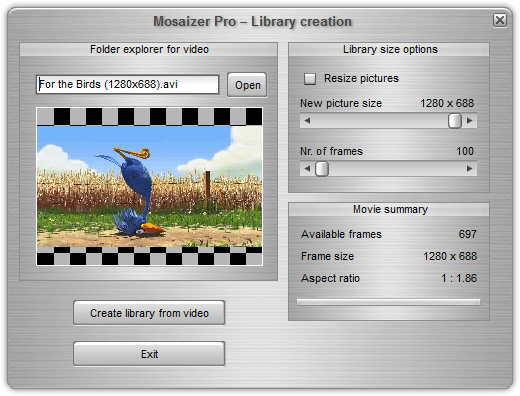
Use the explorer on the left to
navigate to the folder, then select the file you want to use for the library.
Here (a part of) the famous Pixar movie: 'For the Birds
(1280x688).avi'
.
The
application already indicates the frame size of that file, so only smaller sizes
can be set (here: 480x360 px). Please be aware that video footage can be very
large (720, 1440 or even 1920 for full HD), and it is highly recommended to
resize the library picture to a sufficiently small value that matches with the
intended photo mosaic. Sizes which will be pretty common are between 90-150
pixels (horizontal size). Don't forget to also tick the 'Resize pictures' checkbox.
This will determine the size of the library. There is a hard
limit: the amount of available frames to extract. Use the slider to
select the desired amount. The slider won't go as far as the available number
of frames. Our selected movie has 333 frames, so when 100 frames are
selected each 3rd frame is used for the library. It is highly recommended to have
sufficiently large movies for library creation to avoid that frames are identical (or almost
identical).
First you are
prompted to indicate in which folder the library frames must be saved.
Then you are
prompted to provide a name for the library. Finally
the library is being
created. It depends on the video frame dimensions and the length of the movie how
long this will take. It will vary from several seconds to several minutes.
The bar indicates in the 'Movie summary' box indicates the progress. After completion the library is
immediately available for use.